Do you need computer vision to read construction drawings?
floorplan-parser pulls line geometry out of a drawing PDF two ways: it reads the vector paths the PDF already stores, or it renders the page to pixels and finds the lines with classic computer vision (threshold and Hough lines, no neural network). Both are scored against the drawing's own geometry. This recovers lines, not meaning: it does not know a wall from a door.
uv run python -m floorplan_parser --input plan.pdf --method vector --chain --rooms --output out/plan
Code (MIT): github.com/dzakybd/floorplan-parser. Write-up: dzaky.ai.id. Results were computed ahead of time; this page runs no model.
Synthetic drawing
Score
Precision and recall are measured by length: how much of the extracted linework lies on the true lines (within 2 pt and 5°), and how much of the true linework was found. Pieces per reference line shows fragmentation, which length-based F1 cannot see. Time is the extraction call on an Apple M1 Pro, median of 3 runs.
Held-out FloorPlanCAD drawings (numbers only)
Ten real CAD drawings from the FloorPlanCAD test set: the original three examples plus seven selected within file-size strata using seed 20261019. The raster settings were tuned on the synthetic drawings only, then frozen and evaluated on these. F1 by length, with the number of extracted pieces in brackets.
Lines → walls → rooms (--rooms)
Wall thicknesses are the strongest peaks of the gaps between parallel lines; parallel pairs about that far apart become walls; doorways between collinear walls are bridged; rooms are the closed pieces of page minus walls. Geometry only (Shapely).
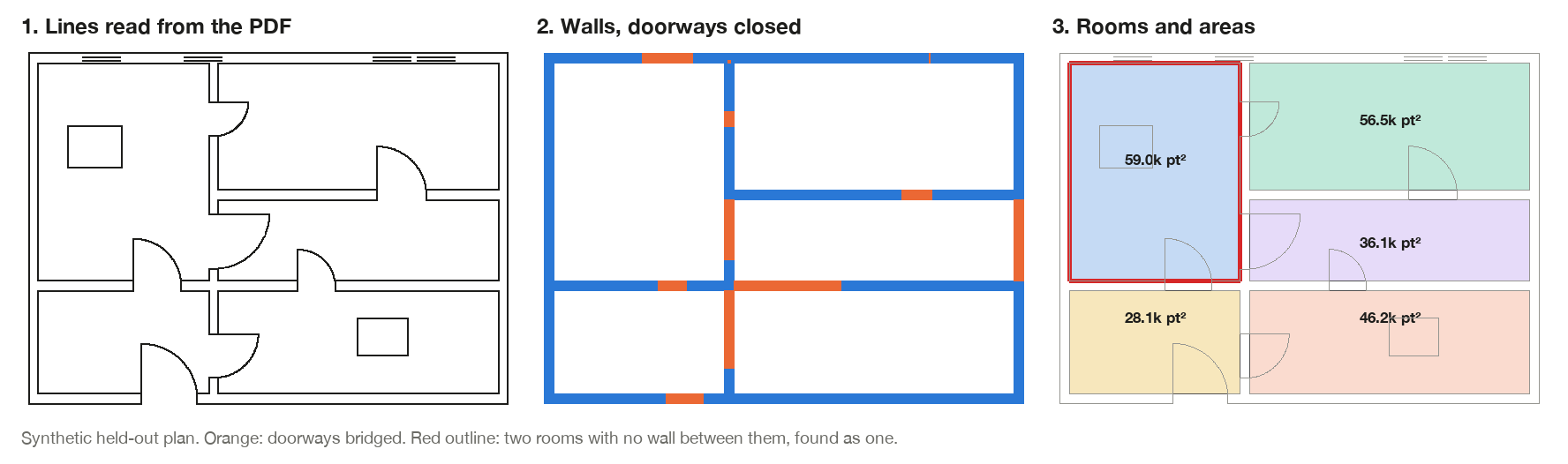
Synthetic plans have a room answer key. Real layouts are ten CubiCasa5K test plans drawn as vector PDFs from their wall, door and room annotations (so the walls are clean); the wall-thickness rule was chosen on ten validation layouts. FloorPlanCAD has no room labels.